
Lockly Secure Pro Zeno Review: Fingerprint Apple Home Key Smart Lock
Looking for a fingerprint smart lock that works with Apple Home Key and built-in Wi-Fi? Lockly Secure Pro Zeno is made for USA homeowners who want fast keyless entry, remote control, guest codes, voice control, and physical key backup in one smart deadbolt.
In this review, I focus on real buyer questions. You will see who should buy it, who should skip it, how it compares with basic keypad locks, and whether the premium price makes sense.
Best for buyers who want fingerprint speed, iPhone tap-to-unlock, and remote access.
The strongest selling point is the full access package. You get 3D biometric fingerprint access, Apple Home Key, built-in Wi-Fi, PIN Genie keypad, app control, and physical key backup.
Therefore, it is a strong match for busy families, Apple users, and homeowners who want several ways to unlock the same door.
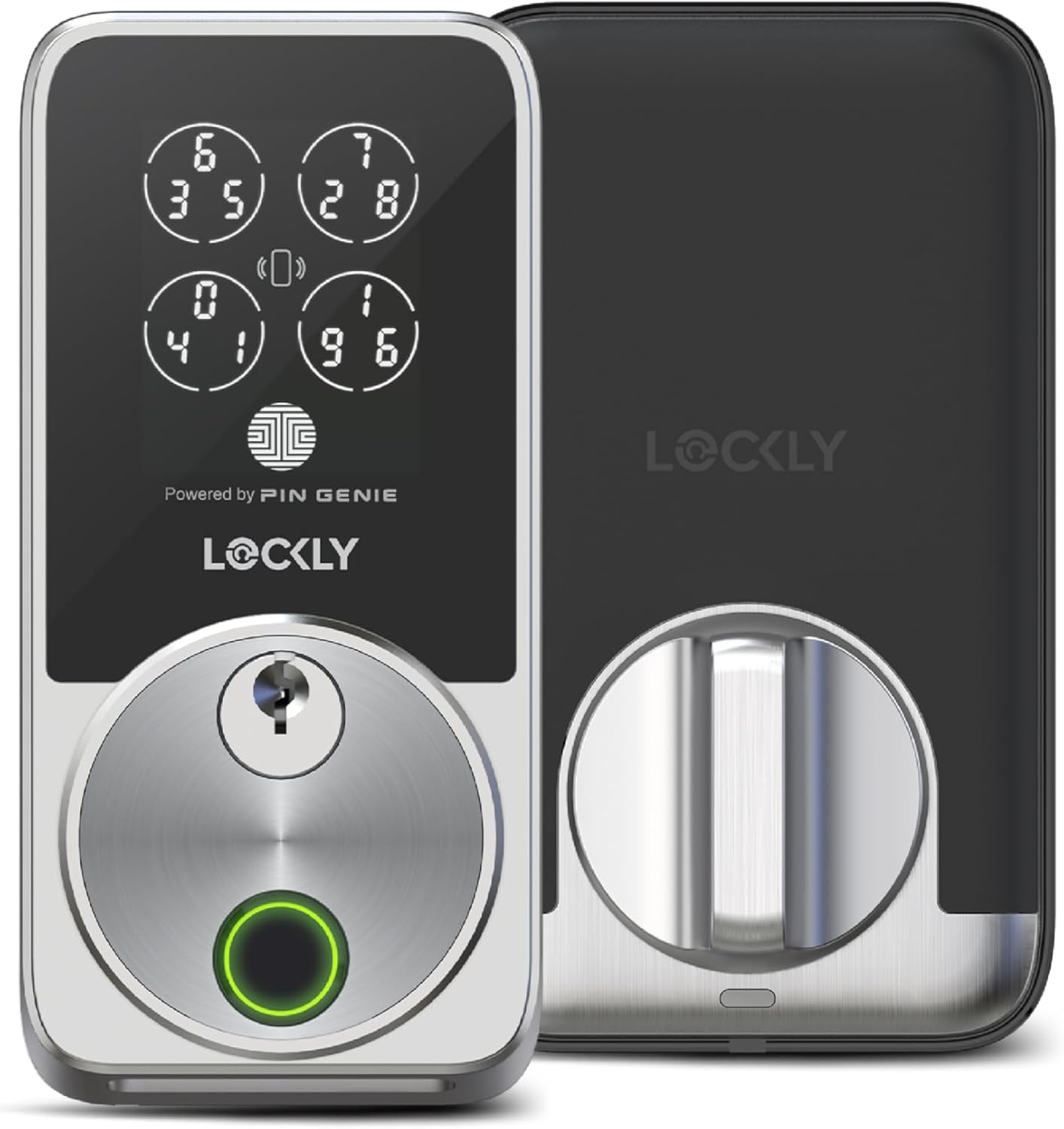
Best for iPhone users, families, front doors, side doors, guest access, remote control, and buyers who want fingerprint entry plus Apple Home Key support.
Lockly Secure Pro Zeno Review: Quick Verdict for USA Buyers
Buy the Lockly Secure Pro Zeno if you want a premium smart deadbolt with fingerprint access, Apple Home Key, PIN keypad, app control, voice control, and physical key backup.
It is especially useful for families. Parents may prefer fingerprint access, Apple users may tap an iPhone or Apple Watch, and guests can use temporary access codes.
However, it may be more than you need if you only want a basic keypad deadbolt. Overall, it is a strong premium pick for USA homeowners who want flexible access and built-in Wi-Fi without a separate bridge.
The Real Problem This Lock Solves
Many smart locks make you choose one main convenience: keypad, fingerprint, app, or Apple Home. Lockly Secure Pro Zeno is different because it gives you several access methods in one lock.
That matters in daily life. Your hands may be full, your phone may be inside, your guest may need a code, or your Wi-Fi may be temporarily down.
As a result, a lock with multiple backup options can reduce everyday frustration.
Fast Fingerprint Entry
Fingerprint access is useful when you arrive home with groceries, kids, packages, or bags.
Apple Home Key
Apple users can unlock by tapping a compatible iPhone or Apple Watch. Therefore, entry feels familiar and simple.
Built-in Wi-Fi
Built-in Wi-Fi supports remote lock and unlock, app control, and notifications. In addition, you do not need a separate Wi-Fi bridge.
Fingerprint Smart Lock with Apple Home Key: Why This Angle Works
Instead of targeting only “best smart lock,” this page targets a narrower buying problem.
Best fingerprint smart lock with Apple Home Key and built-in Wi-Fi.
This angle is more conversion-focused. The buyer is not just browsing smart locks. They want fingerprint speed, Apple compatibility, remote access, and secure keypad entry in one product.
Moreover, this page naturally targets lower-competition buyer keywords. Examples include “fingerprint smart lock for front door,” “Apple Home Key smart lock with fingerprint,” “smart lock with built-in Wi-Fi,” and “Lockly Secure Pro Zeno worth it.”

Lockly Secure Pro Zeno Key Features
These features matter most for real buyers because they solve daily access, security, and convenience problems.
3D Biometric Fingerprint
Fingerprint access is the fastest everyday unlock method for many users. Also, it is useful when you do not want to pull out a phone or remember a code.
PIN Genie Keypad
Lockly’s PIN Genie keypad changes number positions. Therefore, it can reduce the risk of someone guessing your code by watching finger movement.
Apple Home Key
You can add the lock to Apple Wallet and tap your iPhone or Apple Watch to unlock. This is a major selling point for Apple Home users.
Remote App Control
Built-in Wi-Fi allows remote control through the app. As a result, you can lock, unlock, manage access, and receive alerts.
IP65 Weatherproof
The lock is designed for outdoor use. This makes it practical for front doors, side doors, and exterior entries.
Physical Key Backup
A physical key option is included. Therefore, you still have manual backup access if your phone is unavailable.
Watch: Lockly Secure Pro Zeno Installation Video
A product video helps buyers understand the installation process, size, and everyday operation before clicking through to Amazon.
More useful video: Lockly Secure Pro Zeno review video
Specs at a Glance
| Feature | Lockly Secure Pro Zeno Details | Why It Matters |
|---|---|---|
| Lock Type | Deadbolt smart lock | Designed for front-door and home-door use. |
| Access Methods | Fingerprint, Apple Home Key, PIN keypad, app, voice, physical key | Multiple ways to unlock reduce daily friction. |
| Connectivity | Built-in Wi-Fi | Remote access without a separate bridge. |
| Smart Home | Apple Home, Alexa, Google Assistant, iOS and Android app control | Useful for homes with mixed devices. |
| Security Feature | PIN Genie keypad and 3D biometric fingerprint access | Good for families, guests, and everyday keyless use. |
| Weather Rating | IP65 weatherproof | Important for exterior doors in changing weather. |
| Dimensions | 5.31 x 3.03 x 4.53 inches | Helps buyers check size before ordering. |
| Best For | USA homes, Apple users, busy families, front doors, guest access | Strong fit for buyers who want convenience and backup options. |
Fingerprint Access: The Everyday Convenience Feature
Fingerprint entry is the feature most people will notice first. It removes the need to type a code, pull out a phone, or carry a key every time you come home.
This is especially helpful for families. Trusted users can unlock quickly, while guests can still use temporary codes.
In short, fingerprint access makes the lock feel faster and easier in daily use.


Apple Home Key: A Strong Reason to Choose This Lock
For iPhone and Apple Watch users, Apple Home Key is one of the most attractive features. You can tap your compatible device to unlock instead of opening an app or typing a code.
Moreover, this feature makes the Lockly Secure Pro Zeno a smart option for Apple Home households.
It also gives the page a stronger SEO angle because “Apple Home Key smart lock with fingerprint” is more specific than a generic smart lock keyword.
Built-in Wi-Fi vs Wi-Fi Bridge: Why Lockly Secure Pro Zeno Is Convenient
Built-in Wi-Fi is important because many smart locks require a separate bridge or hub for remote access. With this model, remote lock and unlock features are built into the lock system.
As a result, you can manage access, check activity, and receive notifications from the app.
For homeowners who want fewer accessories, this is a meaningful advantage.

Door Compatibility Before You Buy
Before buying any smart deadbolt, check whether your door is compatible. Lockly Secure Pro Zeno is designed for many standard doors, but not every door setup is ideal.
Check these first
- Door thickness and deadbolt cutout.
- Left or right swing direction.
- Strike plate alignment.
- Existing deadbolt smoothness.
- Whether your door is a storm door or has unusual latch holes.

Lockly Secure Pro Zeno vs Basic Keypad Smart Locks
A basic keypad lock may be cheaper, but it usually offers fewer unlock methods. Lockly Secure Pro Zeno is better for buyers who want fingerprint, Apple Home Key, built-in Wi-Fi, and keypad access in one lock.
| Buyer Need | Lockly Secure Pro Zeno | Basic Keypad Smart Lock | Best Choice |
|---|---|---|---|
| Fingerprint unlock | Yes | Usually no | Lockly Secure Pro Zeno |
| Apple Home Key | Yes | Often no | Lockly Secure Pro Zeno |
| Built-in Wi-Fi | Yes | Depends on model | Lockly Secure Pro Zeno |
| Lower price | Premium | Usually cheaper | Basic keypad lock |
| Guest code access | Yes | Yes | Both |
| Best family use | Strong | Good | Lockly Secure Pro Zeno |
Pros and Cons
Pros
- Fingerprint access is fast and convenient for daily use.
- Apple Home Key support is excellent for iPhone and Apple Watch users.
- Built-in Wi-Fi allows remote access without a separate bridge.
- PIN Genie keypad adds a stronger code-entry experience.
- App control, voice control, and physical key backup give flexible access.
- IP65 weatherproof design is useful for exterior doors.
Cons
- Premium price compared with simple keypad locks.
- May be more advanced than some buyers need.
- Door compatibility should be checked before purchase.
- Smart-home setup may require account and app configuration.
- Battery management is still part of ownership.
Who Should Buy It?
Buy Lockly Secure Pro Zeno if...
- You want fingerprint unlocking for daily entry.
- You use iPhone or Apple Watch and want Apple Home Key.
- You want remote access without a separate Wi-Fi bridge.
- You need temporary access codes for guests, family, or service workers.
- You want keypad, app, voice, and physical key backup in one lock.
Skip it if...
- You only need the cheapest keypad deadbolt.
- You do not care about fingerprint access.
- You do not use smart-home features.
- Your door is not compatible with standard deadbolt installation.
- You prefer a very simple non-connected lock.
Product Gallery
These images help buyers understand the lock design, fingerprint access, app control, Apple Home Key support, and installation style.


Is Lockly Secure Pro Zeno Worth It?
Lockly Secure Pro Zeno is worth considering if you want more than a basic keypad lock. It gives you fingerprint access, Apple Home Key, built-in Wi-Fi, a secure keypad, app control, and physical key backup.
That combination makes the most sense for busy households and Apple users.
On the other hand, budget-focused buyers who only need code entry may be fine with a cheaper keypad lock.
Final recommendation
For USA homeowners who want a premium fingerprint smart lock with Apple Home Key and built-in Wi-Fi, Lockly Secure Pro Zeno is a strong option.
The best reason to buy it is flexibility. You are not locked into one unlock method.
You can use fingerprint, iPhone, Apple Watch, PIN code, app, voice assistant, or physical key depending on the situation.
Frequently Asked Questions
Does Lockly Secure Pro Zeno have fingerprint unlock?
Yes. It includes 3D biometric fingerprint access for fast keyless entry.
Does Lockly Secure Pro Zeno work with Apple Home Key?
Yes. It works with Apple Home Key, so compatible iPhone and Apple Watch users can tap to unlock.
Does this lock have built-in Wi-Fi?
Yes. Built-in Wi-Fi supports remote app control and notifications without needing a separate bridge.
Is Lockly Secure Pro Zeno good for USA front doors?
Yes. It is designed for many standard home doors, but you should check door thickness, backset, and deadbolt compatibility before buying.
Can guests use access codes?
Yes. You can create access codes for guests, family, service workers, or emergencies through the lock system.
Is the PIN Genie keypad useful?
Yes. PIN Genie changes number positions on the keypad, which helps reduce the risk of someone guessing your code by watching your hand movement.
Is Lockly Secure Pro Zeno weatherproof?
Yes. It is listed with IP65 weatherproof protection, making it suitable for many exterior door setups.
Is Lockly Secure Pro Zeno worth the price?
It is worth considering if you want fingerprint access, Apple Home Key, built-in Wi-Fi, secure keypad entry, and multiple backup unlock options in one lock.
Bottom Line: A Feature-Rich Smart Lock for Apple Users and Busy Families
Lockly Secure Pro Zeno is a strong choice if you want fast fingerprint unlocking, Apple Home Key, built-in Wi-Fi, PIN Genie keypad security, and flexible access for family or guests.
It is not the cheapest smart lock. However, it offers a stronger feature set than many basic keypad models.
For USA homes that need convenience and multiple backup options, it deserves serious consideration.
Buy Lockly Secure Pro Zeno on AmazonPrice and availability can change. Always check the latest product details on Amazon before purchasing.
References
For general background, see Wikipedia: Smart lock and Wikipedia: Biometrics.
Fingerprint smart lock with Apple Home Key and built-in Wi-Fi


